
QuickBooks Hosting Support
QuickBooks
Hosting
Services
With QuickBooks hosting, you’ll have remote access to the full power of QuickBooks Desktop anytime, anywhere, from any device. Combine this with Smbdaily CX, our cloud based UI for QuickBooks Desktop, and reduce your overall hosting costs.
QuickBooks Remote Hosting Customized For You
Whether you’re looking for a basic QuickBooks–hosted environment or a complex multi-user enterprise solution with custom applications and external integrations, Smbdaily can help.
Because we work with multiple QuickBooks hosting companies, we can offer a QuickBooks cloud hosting solution that’s suited to your specific requirements.
Multi-User Access
Have multiple users access the same QuickBooks company file at the same time such as a business user and a CPA.
No Risk
Choose a risk-free service agreement with a 90-day cancellation policy.
Multiple QuickBooks Versions
Run any number of desktop editions –from QuickBooks Pro to QuickBooks Enterprise, as well as unsupported versions.
Complete Compatibility
Access your hosting account via any web browser from any device, such as a PC, Mac, iPhone, Android.
Dedicated Servers
Optional dedicated servers for extra performance and reliability. Call for a custom quote.
Access Multiple Files
Access multiple QuickBooks company files from a single log-on, all within your hosted desktop account.
Unlimited Storage
Unlimited storage is available; however, files nearing the maximum safe size limit may become susceptible to corruption. If your file is approaching this limit, please contact Smbdaily for assistance.
Extra Functionality
Increase productivity with remote desktop functionality. Export QuickBooks data in Word, Excel or .PDF formats, print documents, and scan documents directly into your account.
Integrated Applications
Continue doing business your way with seamless communication and access among all your related business applications like Microsoft Office, Avalara, Bill.com and many more.
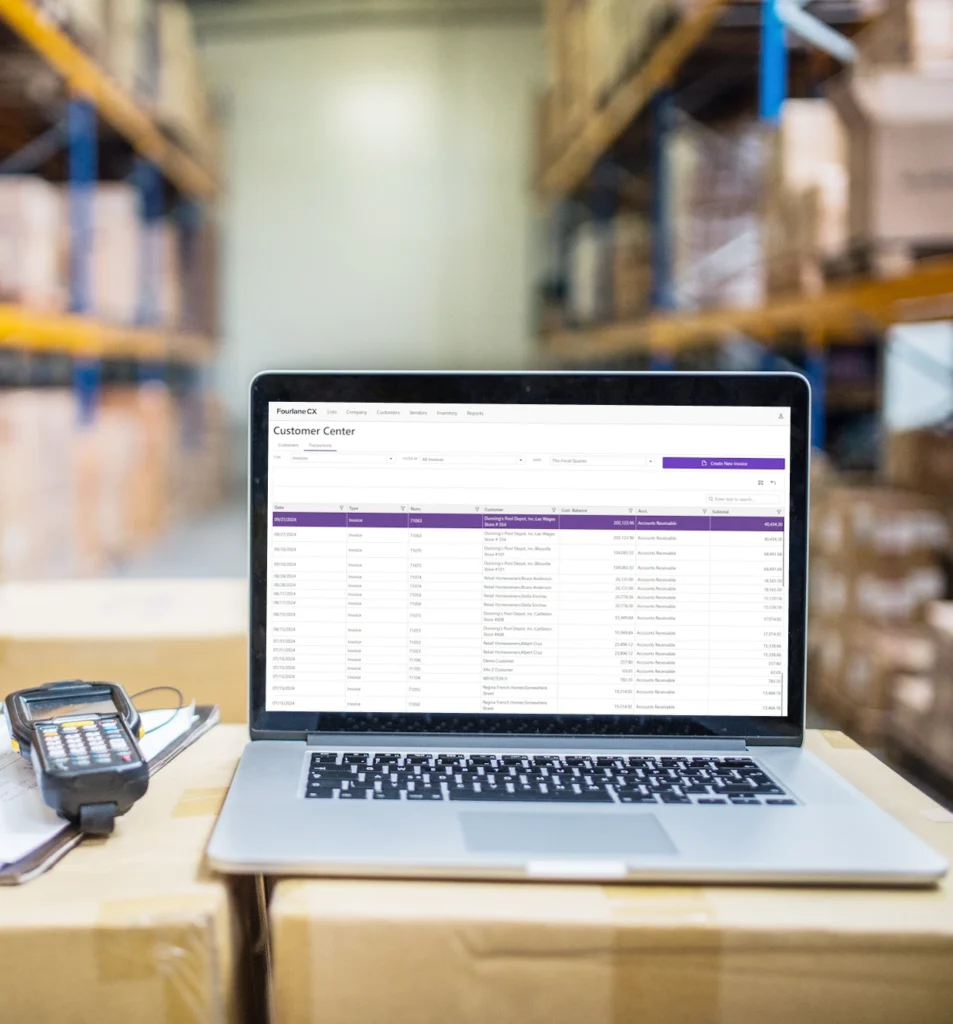
NEW! Cloud based interface for QuickBooks Desktop
What is Smbdaily CX?
Smbdaily CX (Cloud Experience) is a cloud-based user interface for QuickBooks Desktop – a great solution for users who prefer to use QuickBooks Desktop vs Online but want a true cloud based application.
It looks and feels like QuickBooks
Smbdaily CX has the same look and feel as QuickBooks Desktop with features easily accessible such as creating estimates, accessing the chart of accounts, creating sales orders, reporting, inventory, invoicing, and many other tasks typically done in QuickBooks Desktop.
Lightning-fast and scalable
Is your QuickBooks Desktop file struggling to keep up? Smbdaily CX is built from the ground up to be fast. Smbdaily CX also supports multiple company files and over 40 users.
Extensible and customizable
Need functionality that QuickBooks can’t do? Smbdaily CX can be used to create custom add-ons – turning QuickBooks Desktop Enterprise into an ERP.
QuickBooks Desktop Hosting Plans
Cloud Hosting
QuickBooks Desktop with Cloud access hosting plan
Call Us
- Set-up and onboarding costs are waived
- 2 data centers
- Multifactor authentication by DUO (Cisco)
- Anti-Virus protection by CrowdStrike
- Integrates with Microsoft Office Suite and Google Workspace
- Access to third-party applications and troubleshooting with Bill.com, Expensify, Tallie, Avalara, Dext, Qvinci, and hundreds of others
- Support includes: server support & engineering escalation
- Veeam automated daily back-up and recovery
- Microsoft server license and patching updates
- QuickBooks updates
- Server Specifications:
- • 6 CPUs (expandable)
- • 16 GB of RAM (expandable)
- • 150 GB SSD Storage (expandable)
- Ask about our special pricing for 10+users!
Certified QuickBooks Experts
Smbdaily Drive
At Smbdaily, we have a proven client engagement process that helps ‘drive’ long-term success.
1. Discover
Understand the systems and current processes to discover root issue.
2. Right Fit
Open and authentic communication on which products are a right for your organization.
3. Inform
Comprehensive project planning process to keep you informed and limit obstacles.
4. Vision Implementation
The goal is to achieve data visibility that empowers informed business decision-making.
5. Execute
Execute ongoing system reviews to ensure processes are followed, investment is optimized, and you can make fast, confident business decisions.